

Finding an AI developer in 2026 is not the same as hiring a normal web developer. AI work needs software skill, product thinking, data knowledge, and a clear sense of where AI can go wrong. The best AI developer is not just someone who can connect to an AI model. They should understand how to build a useful tool around the model, including the interface, data handling, testing, review steps, and user flow.
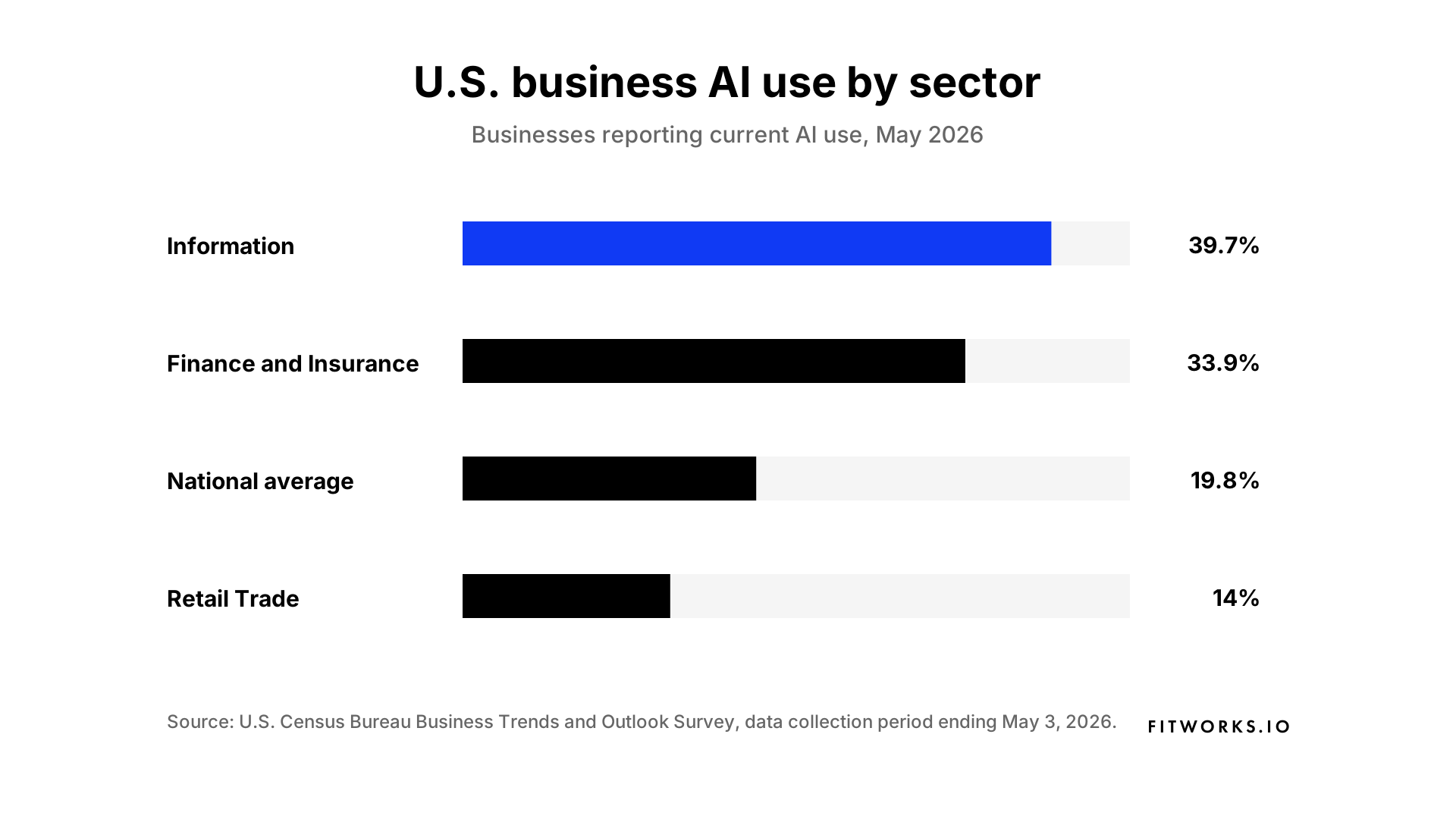
AI is already part of everyday business, but adoption is uneven. Our 2026 AI use by sector chart uses U.S. Census Bureau BTOS data to show especially high current AI use in the Information and Finance and Insurance sectors. For businesses outside those leading sectors, this is a useful signal. Now is a good time to add practical AI to workflows, but the right developer matters because the value comes from turning AI into a reliable product, not just adding a chatbot or demo.
Start with the problem
Before you look for an AI developer, define the problem. Do you need an AI website tool, an internal knowledge assistant, a proposal generator, a workflow automation system, or a prototype for investors?
A good AI developer will ask about the users, the data, the workflow, and the risks. They will want to know what happens when the AI gives a weak or wrong answer. Be careful if someone recommends a model before they understand the job.
The model is only one part of the product.
Look for product thinking
Many AI projects fail because they stay as demos. A demo can look impressive for five minutes, but a real product has to work for real users.
A good AI developer should be able to explain who will use the tool, what task the AI helps with, where a human should review the output, what data the system needs, what should not be automated, and how success will be measured.
This is important for business tools. An AI assistant that gives answers without sources can create more work. An automation tool that skips approvals can create risk. An AI content tool without brand controls can produce generic work that still needs heavy editing.
Look for a native AI workflow
In today’s market, speed matters. A developer who works in an old way may take longer to plan, build, and revise a product. This does not mean older methods are bad. It means the best AI developers have updated how they work.
A native AI developer uses AI tools as part of the build process. They may use Cursor, Claude, ChatGPT, or other coding assistants to move faster through research, interface ideas, code generation, refactoring, test writing, and debugging. This can reduce cost and shorten timelines because more work gets done in less time.
Speed alone is not enough. The developer still needs to check the code, understand the architecture, test the product, and make careful decisions. Native AI developers can be better value for money when they combine AI-assisted speed with strong engineering judgement and real software experience.
Check their software skills
An AI developer still needs strong software skills. They should understand front-end interfaces, backend APIs, databases, authentication, deployment, logging, and testing.
AI systems are still software systems. Weak engineering becomes clear as soon as real users start using the tool.
Ask how they would handle user roles, errors, prompt changes, model updates, rate limits, and fallback behaviour. If the answer is vague, the project may be hard to maintain later.
Ask how they handle data
Many useful AI tools depend on the data around the model. This is true for knowledge assistants, support bots, proposal generators, reporting tools, and internal automation.
The developer should understand document ingestion, search, permissions, source display, and retrieval-augmented generation. They should know how to keep answers connected to your real material.
Ask how the tool will show sources. Ask how private data will be protected. Ask what happens when the system cannot find a reliable answer.
Test their approach to accuracy
AI output needs review. A good developer should talk about testing, edge cases, human approval, logs, and quality checks.
They should also know when not to use AI.
AI coding tools are popular, but popular does not mean perfect. Stack Overflow’s 2025 survey shows that many developers use or plan to use AI tools. Even so, a good developer still reviews, tests, and owns the work.
Review their past work
Look for work that goes beyond a simple chat window. Strong examples usually include clear user flows, integrations with existing tools, review screens, source links, dashboards, secure data handling, and real deployment experience.
If they cannot show live work because of client privacy, ask them to explain a previous project. They should be able to describe the problem, the stack, the risks, and the testing approach without sharing private details.
Start with a small paid task
Do not begin with a large build if you are not sure. Start with a small paid discovery or prototype task.
Ask the developer to map the workflow, review the data, list the risks, suggest a technical plan, and build a small proof of concept.
This gives you a better signal than a portfolio alone. You will see how they think, how they communicate, and whether they can turn a loose idea into a practical plan.
Questions to ask
Use these questions before you hire.
- What parts of this project should not use AI?
- How would you test the quality of the output?
- What happens if the AI gives a wrong answer?
- What data does the system need?
- What should we build first to prove the idea?
The best answers will be clear and specific. They will include trade-offs. They will not make AI sound like magic.
Red flags
Be careful if a developer promises perfect accuracy, cannot explain the architecture, treats prompting as the whole product, ignores privacy, avoids testing, only shows screenshots, or says any model can solve the problem.
AI projects can move quickly, but they still need structure. Speed without review usually becomes technical debt.
Skills to look for
The right skill mix depends on the project. In most cases, look for a developer who understands TypeScript, Python, API development, databases, AI APIs, search, document processing, UX, security, testing, and deployment.
For creative AI projects, it also helps if the developer understands image, video, motion, content systems, and brand workflows. For internal tools, look for someone who understands operations and integrations. For customer-facing tools, UX and reliability matter even more.
Conclusion
The right AI developer is not just someone who can call an AI API. They should help you decide what to build, what to avoid, how to test it, and how to make the tool useful for real people.
AI adoption is already widespread. The gap between a demo and a dependable product is still large. When hiring, look for clear thinking, strong engineering, careful data handling, review workflows, and an honest understanding of AI’s limits.
FITWORKS.IO designs and builds AI prototypes, internal tools, workflow automations, and AI-assisted websites. If you are trying to find an AI developer for a product or business workflow, get in touch and we can help you define the right approach.